
Flight Schools and ATOs

Why Choose Our Solution?
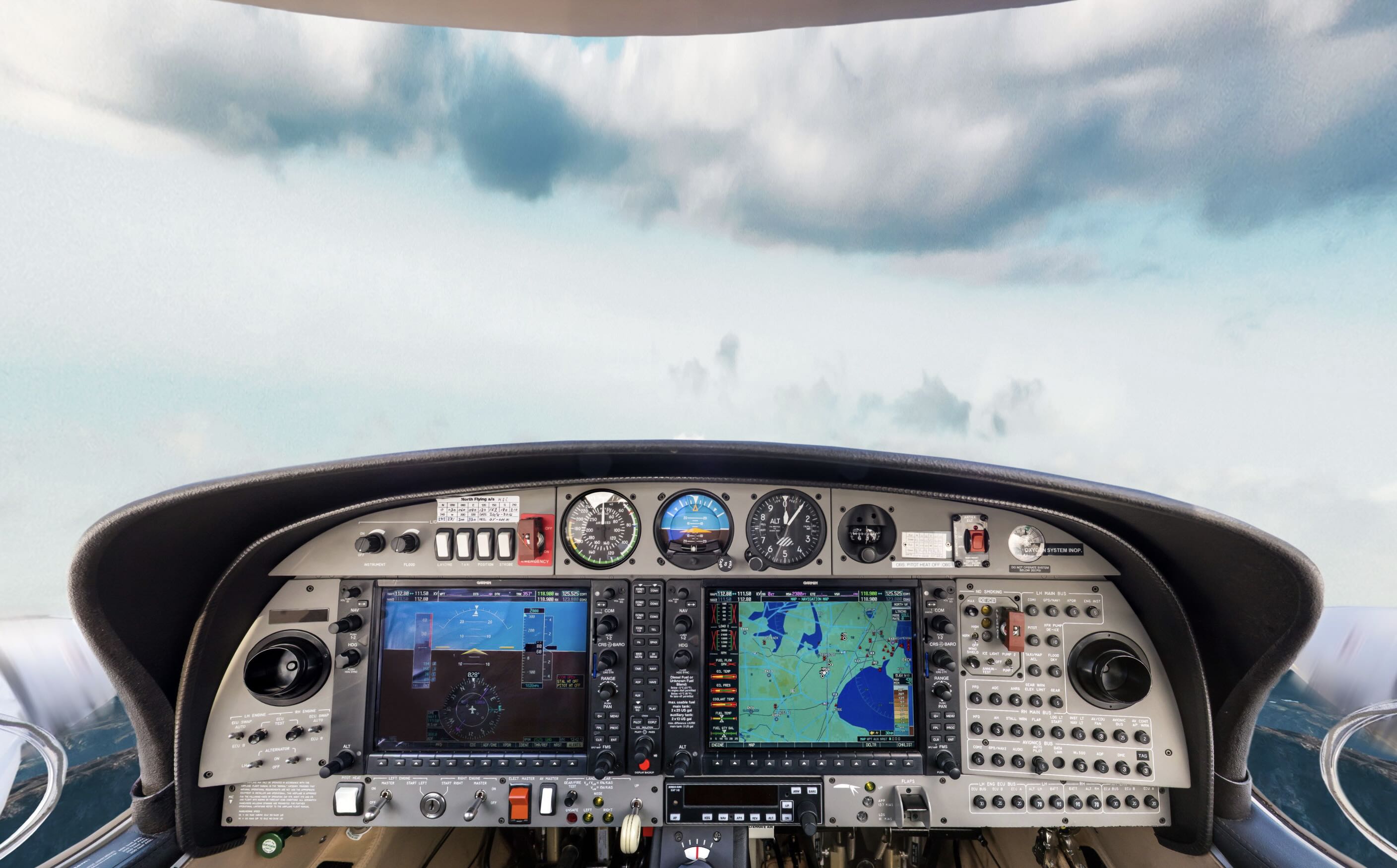
Digital Twin. Your Next Generation OTD.


From Photoshoot to First Lesson
Training content expertly designed with inputs from industry specialists.
Export to your LMS as SCORM or xAPI, or run it on ours. Students prepare at home, on their own phones.


Interested in Full Solution? Hire an Expert!
Features of
Cockpit Procedure
Trainer
Easy Distribution
Cockpit Procedure Trainer can be easily distributed to students or integrated with your current systems. Learn more about integration here.




Updates On Your Terms
We handle every update. When a checklist or a panel changes, the trainer changes with it. Or edit it yourself in the browser. Three ways to work:
We do everything, start to finish
Collaborate with us to tailor your cockpit trainer
Take the lead with our expert guidance to craft your cockpit trainer
Safe and Realistic Training with Virtual Aircraft
Boost training with virtual aircraft twin for easy scheduling and consistent sessions. Ensure your students master procedures and prepare for real-world challenges without any risk.
Reliable Procedure Training

Training Ready in 4 Weeks
Get your trainer ready for the next training session with Panomio's unrivaled speed of delivery. Custom VR training can take months to roll out. With Panomio you can launch a comprehensive Cockpit Procedure Trainer within just 4 weeks.


Frequently Asked Questions
Yes, Panomio offers unlimited free access to three courses, shareable via web link. If you want to create complex courses and export them for LMS, you can upgrade to a plan that meets your needs.
We generally work in the unclassified layer: walk-around, ground handling, servicing, cabins and compartments, operator stations, facilities. If your requirement sits above that, we will tell you on the first call.
But we also have projects inside a classified military environment.
A simulator trains one driver at a time, on driving. Panomio trains the whole class on the train itself: cab layout, preparation, procedures and faults. Drivers arrive at the simulator already knowing the cab, so simulator time goes on driving.
You do. The 360° captures of your equipment and the course content built on them belong to you, not to us. Your team authors and maintains it, so you are not buying a service contract you cannot leave.
Yes. The instructor teaches from the course on the classroom screen, and trainees interact with the train on the screen or on their own iPads.
Absolutely, our in-house experts can create a custom course using your content. This includes consultation, 360° photography, design, content preparation, course development, and distribution or integration with your existing training platform.
One day of 360° photography on site, then four to six weeks to launch.
Yes. The same course works as e-learning on a driver's iPad, phone or computer, so they can prepare before class, catch up on a missed session or refresh a procedure later. Completion is tracked in your LMS.
Yes, we can assist with the entire course development process, including consulting, 360° photography, design, content preparation, course development, and distribution or integration with your existing training system.
SCORM, xAPI and LTI export into whatever platform you already run, or deep links from your own system. Most defense training programs are assembled rather than bought, so Panomio is built to be a component of one.
Yes. Your courses are written in the language your drivers use, whether that is German, Italian or any other language.
With our Panomio authoring tool, you can easily update the content at any time. No coding is required. Choose the plan that suits you and update, duplicate, or create new courses as needed.
Yes. Courses download to the app and run with no connection, then sync progress when there is one. Distribution can also be restricted to your own network, so a course is reachable on premise only rather than shared openly with personnel.
Within 8 weeks for an entire train, from photography to a course your instructors can teach. The train is photographed in a single visit during stabling or a maintenance slot, and it is back in service the next morning.
Yes, our system supports SCORM 1.2, SCORM 2004, and xAPI (Tin Can) standards.
Yes. The Danish Home Guard's own instructors author and maintain their Twin Otter cockpit content. When a procedure changes, your team edits it directly. We can also handle updates for you if thats what you prefer.
Yourselves. Lokaltog's trainers author their courses in-house. We typically build the first course together with your team and then hand over the keys, and full-service production stays available if you prefer it.
Panomio is designed with both, end-user and employer in mind. The user interface is designed for tablets and phones, that employees already have in their pocket and it doesn’t require employer to purchase any additional hardware.
The design on mobile devices is not compromised. It is truly responsive, providing full immersive learning experience.
Panomio runs on iOS, iPadOS and Android (both tablet and phone). We also support these desktop browsers: Chrome, Firefox, Safari, Edge.
No. We have captured a mobile generator and military optics, and built full train digital twins for two Nordic rail operators. Ground support equipment, hand-held and man-portable systems, vehicles, cabins, operator stations, facilities and workshops are all in scope. A walk-around of a locomotive and a walk-around of an armored vehicle are the same job.
Yes. Export SCORM 1.2, SCORM 2004 or xAPI into the LMS you already run, or use Panomio's own LMS with completion tracking. Those completion records support the periodic competence checks required under EU Directive 2007/59/EC, though your examiners and your national framework still govern certification.
You can upload text, images, videos, PDFs, links and audio.
Two parts: a one-time photography and build project per train type, and a monthly platform subscription. Both depend on your fleet and the number of drivers, so we quote after a short call about your trains.
Capture
To build virtual trainers in Panomio, you must capture your working environment to create the virtual workplace. Virtual workplace can be created by 360 panoramic images (photographs or 3D computer generated images) or regular images.
Build
Use the features to deliver high-end procedural training:
Use Linear Flow to present step-by-step instructions.
Use Hotspot Map to present working environment.
Use Quiz to ask multiple choice questions.
Use Hidden Area to ask learners to point specific location within virtual workplace.
Publish
Export your immersive courses as SCORM 1.2, SCORM 2004 or xAPI (Tin Can) and import courses in Learning Management System (LMS) or share previews through web links.
Your own team keeps it current, with no coding. Where the physical change is visible, the changed area is re-photographed and swapped in. There is no vendor change-order queue.
Yes. The trainer is built from photographs of your own rolling stock and written from your own procedures, so what drivers see on screen matches what they find in the cab. Book a call and we will walk through your fleet list.


